TrailTree Download

Every email trail, on one map.

TrailTree follows a discussion through every reply, forward and changed subject line — in your mailbox and in your archive files — and draws it as one tree. Nothing gets lost when the subject changes.

For classic Outlook and Exchange Server webmail, on Windows 10 and 11. The trail map is free.

20 Oct28 Oct3 Nov12 Nov 563L pulldown test — EPP verification 563L compressor noise above limit 563L — QA clearance for pilot production FK RI TH FK RI TH FK RI NJ
One test, nine emails, three subject lines: TrailTree keeps them together.

Outlook shows you pieces. TrailTree puts them back together.

A test that runs for three weeks becomes forty emails. Someone renames the subject when the noise fails, someone forwards it to Production, and half of it went into last month’s archive file.

Search finds the pieces. TrailTree shows the whole story: who started it, where it split, what changed and who has to answer next.

  • Finds every part by itselfYour mailbox, the Online Archive and every .pst archive file on the PC — no exporting, no picking files by hand.
  • Draws the treeReplies and forwards stay together even when the subject line changes. Each subject line gets its own colour.
  • Never hides a new versionRev 02 → Rev 03, V1.2 → V1.3, Program_V2.04: every version in subjects and file names is tracked, with the latest marked.
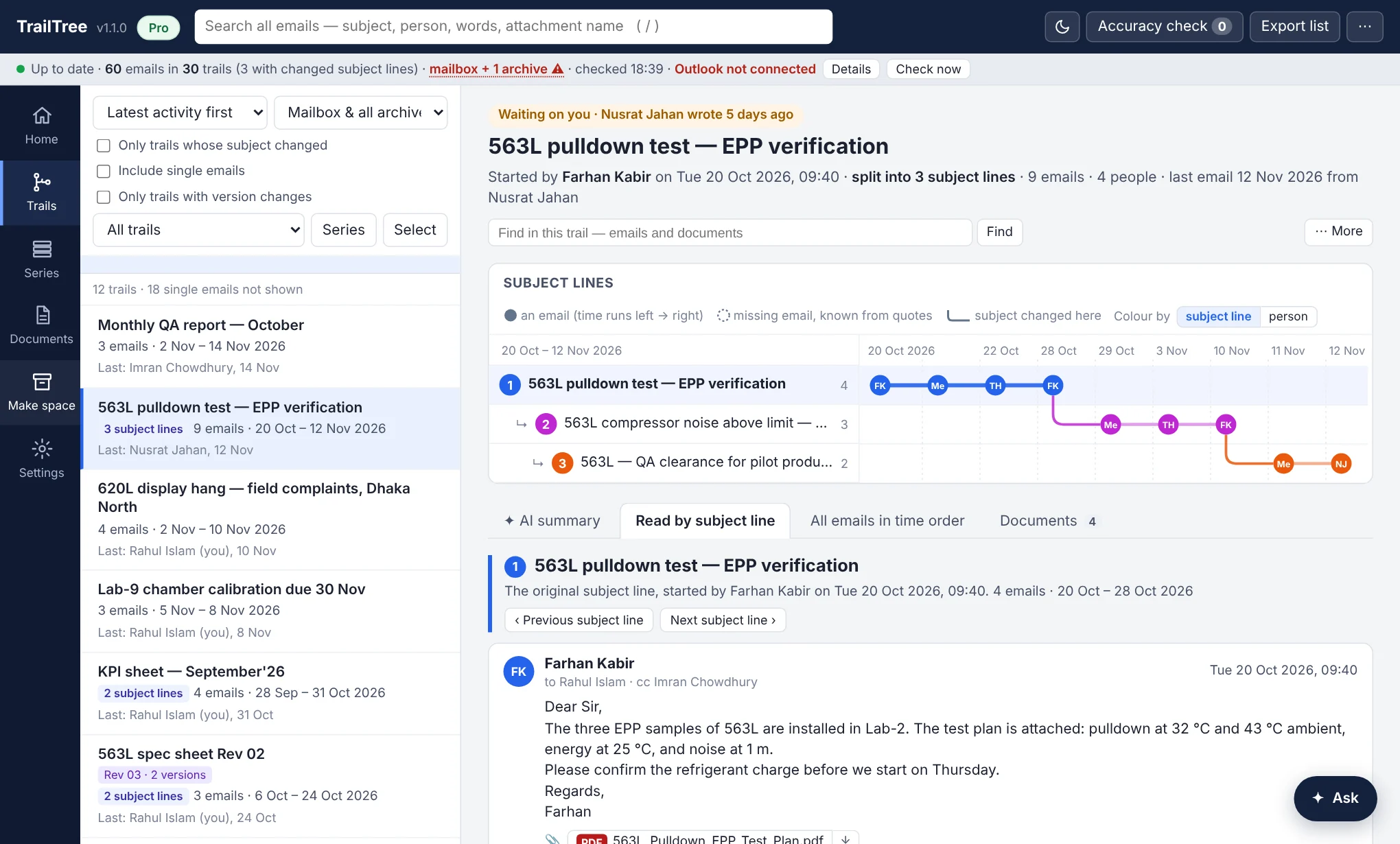
A trail in TrailTree: the map of three subject lines over time, and the emails of the first subject line

The whole trail on one screen

Each dot is an email, each row a subject line. Click a dot to read it, or read the trail line by line or in time order. Home tells you what is new since your last visit, and which trails wait on you.

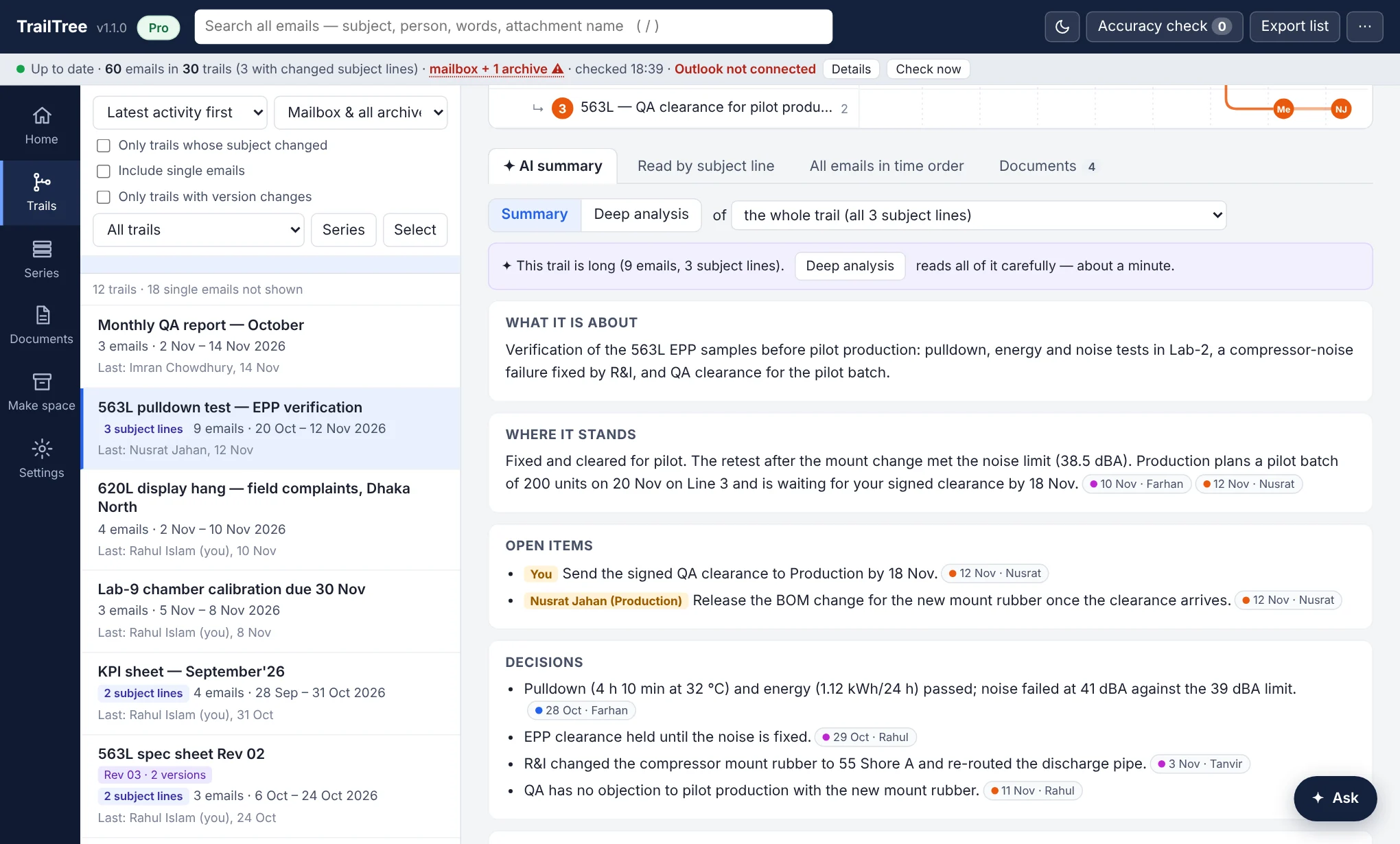
An AI summary of a trail: what it is about, where it stands, open items with owners, and decisions, each linked to its email

An AI summary you can check

What it is about, where it stands, open items and who owes them, decisions and documents — each point linked to the email it came from.

  • Ask questions about one trail or all your mail, in English or Bangla.
  • Have the AI read an attached document in full — scans and pictures too — and report what is in it.
  • Deep analysis for long trails, when it matters.
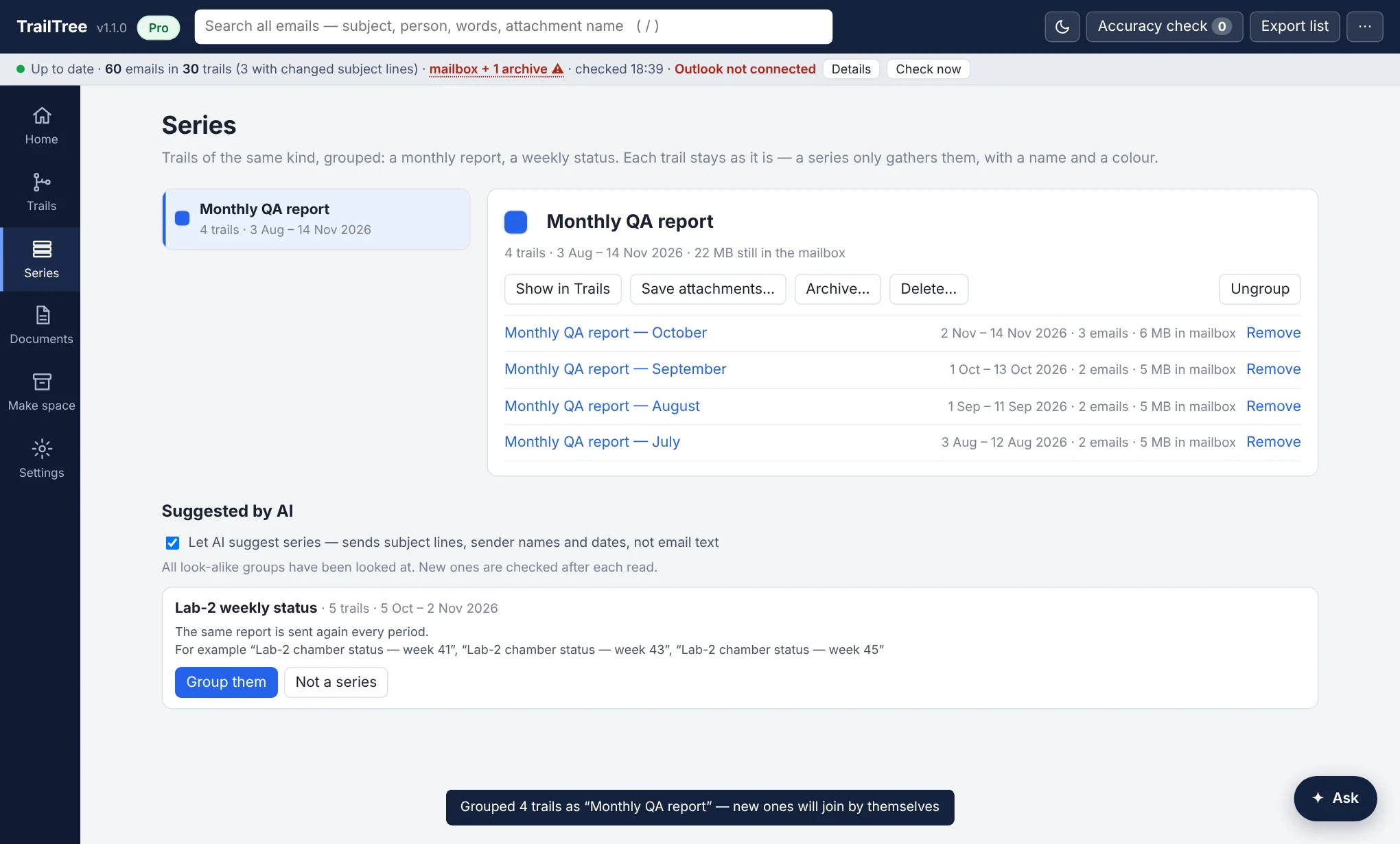
The Series page: a monthly report grouped as one series, with its trails and buttons to archive or delete older ones

Series, and a mailbox that stays under its limit

Monthly reports and weekly statuses become a series, with a name and a colour. When the mailbox fills up, archive or delete the older trails of a series in one go — whole trails, never split, always after you confirm, and every clean-up can be undone.

Free and Pro

The trail map is free for your own mailbox. Pro adds your archive files, the AI and the tools for a full mailbox.

What you getFreePro
The trail map: replies, forwards and changed subject lines as one treeYesYes
Search, Home (what is new, what waits on you), series, versionsYesYes
Archive files (.pst), the Online Archive and archive folders—Yes
AI summaries, Ask, Deep analysis and document reports—Yes
Documents library, saving many attachments at once—Yes
Make space: archive or delete safely, by series or by age—Yes
Export to Excel—Yes

Try Pro for 14 days on your PC, no card needed: choose “Start the 14-day trial” when TrailTree starts.

Pricing

Bangladesh

৳999a month
৳9,990a year — two months free

Pay by bKash or bank transfer. Email support@trailtreemail.com with your name and the plan you want: you get an invoice, and your licence code once it is paid.

A licence works on two PCs, and includes the AI each month.

Other countries

US$12a month
US$120a year

Card payment is coming soon. Email us and we will tell you when it opens.

For a team or a whole company — more PCs, one invoice — write to support@trailtreemail.com.

Beta testers

Got a beta tester code? It gives you all of Pro on your PC for the beta period. Thank you for testing — tell us what works and what does not.

  1. Download and unzipDownload TrailTree, then right-click the zip and choose Extract All.
  2. Run TrailTree.exeIf Windows says the app is unrecognised, choose More info, then Run anyway. On an office PC, ask IT if it is blocked.
  3. Enter your codeChoose “I have a licence code” and paste your beta tester code. Later: menu ⋯ → Licence.

What you need

Windows 10 or 11, with classic Outlook (the desktop app) or webmail on your company’s Exchange Server. Archive files are found on the PC by themselves.

Your email stays on your PC

TrailTree reads and stores everything in your own Windows profile, encrypted. Email text leaves the PC only when you use an AI feature, and only what that answer needs. Privacy

Questions

Write to support@trailtreemail.com. Inside the app, menu ⋯ → Show log helps us find a problem quickly.